
Data Center Liquid Cooling: Preparing Your Mechanical Team for Change
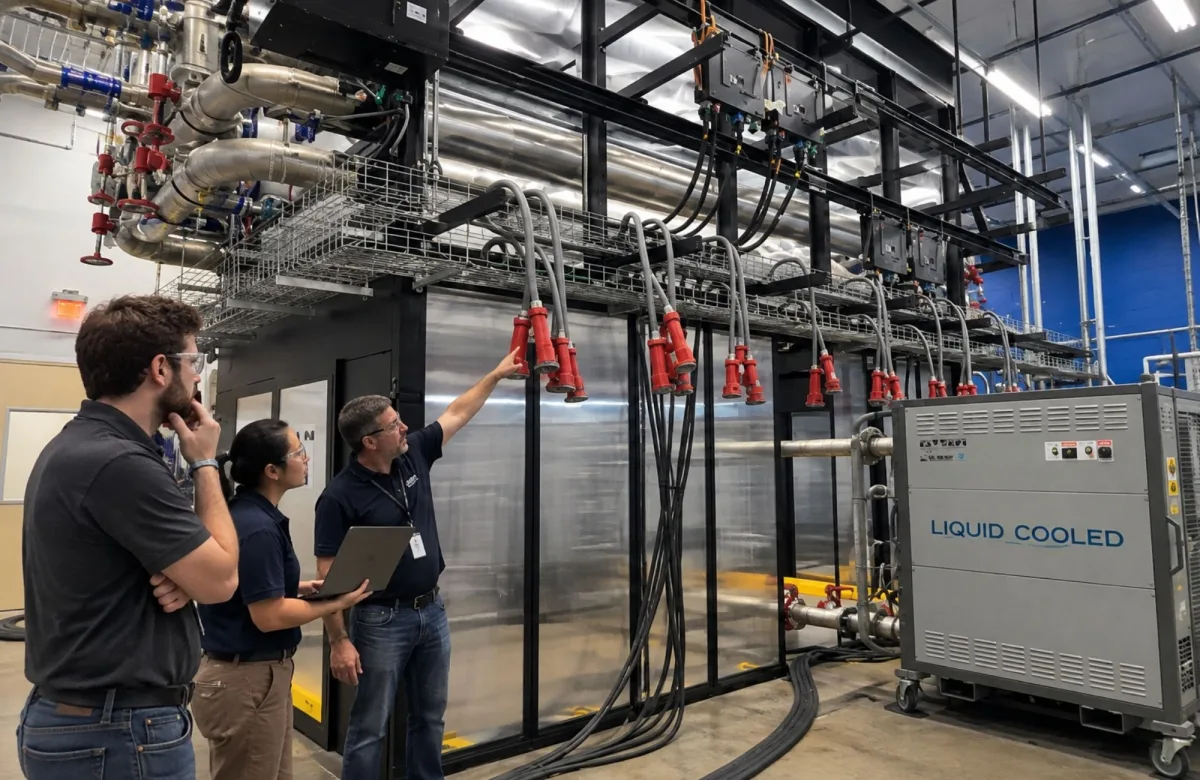
Moving from traditional air cooling to liquid cooling changes more than the equipment inside a data center. It changes what mechanical technicians inspect, monitor, maintain, and respond to.
As modern data centers support higher-density artificial intelligence workloads and high-performance computing, the heat generated per rack continues to rise. That is pushing more facilities to evaluate liquid cooling technologies alongside traditional air cooling methods.
A structured data center cooling technician training pathway can help facilities managers prepare technicians for these changes before new cooling equipment arrives. For data center leaders, the question is not simply whether new cooling solutions are coming. The practical question is whether the mechanical team is ready to operate and maintain them.
What Changes for Technicians When a Data Center Moves to Liquid Cooling?
Liquid cooling moves heat-removal work closer to the IT equipment.
Traditional air cooling relies heavily on computer room air handlers or air conditioners, fans, ducting or raised-floor airflow, containment, chilled-water systems, and room temperature management. Cold air reaches server intakes, server fans move that air across components, and hot air returns to the cooling system so the cycle can continue.
That approach remains important, but high-density data centers can face growing thermal challenges as computing power and rack density increase.
Liquid cooling solutions introduce another layer of equipment and responsibility.
Depending on the design, technicians may now work around:
-
Coolant distribution units, or CDUs
-
Primary and secondary coolant loops
-
Pumps and variable-speed drives
-
Heat exchangers
-
Manifolds and piping
-
Quick-disconnect fittings
-
Cold plates
-
Rear-door heat exchangers
-
Immersion tanks
-
Flow, pressure, and temperature sensors
-
Leak-detection systems
-
Coolant chemistry or water-quality requirements
-
Additional alarms and control sequences
ASHRAE guidance for data center thermal systems describes CDUs, pumps, valves, piping, heat exchangers, sensors, controls, direct-to-chip systems, rear-door heat exchangers, and immersion systems as interconnected parts of the thermal system.
For facilities teams, these liquid cooling applications create a new interface between IT equipment and facility mechanical systems.
Why Liquid Cooling Changes the Facilities Team’s Role
Air cooling and liquid cooling both remove heat, but technicians interact with them differently.
With traditional cooling methods, facilities teams can often maintain a relatively clear boundary between the building cooling system and IT equipment. Mechanical technicians maintain chillers, cooling towers, CRAHs, pumps, controls, and airflow systems. IT teams manage servers and rack equipment.
Direct liquid cooling makes that boundary less distinct.
A CDU, for example, may connect a facility-water system on one side to an IT coolant loop on the other. A leak alarm inside a rack may require coordination between mechanical personnel, operations staff, and IT technicians.
Uptime Institute has identified this division-of-labor issue in its research on liquid cooling. Direct liquid cooling can challenge the traditional separation between facilities and IT responsibilities.
Facilities managers therefore need to define more than maintenance tasks. They need clear ownership.
For each liquid-cooling component, the organization should know:
-
Who monitors it?
-
Who responds to an alarm?
-
Who can isolate it?
-
Who performs routine inspection?
-
Who can open the system?
-
Who verifies coolant condition?
-
Who restores the system after maintenance?
-
When must IT personnel become involved?
-
When must a vendor or OEM technician be called?
Those questions should be answered before an abnormal condition occurs.
Air Cooling vs. Liquid Cooling: How Technician Tasks Change
The transition does not eliminate conventional mechanical skills. In many facilities, technicians will maintain a hybrid environment where air and liquid cooling operate at the same time.
The work expands.
| Technician Task | Traditional Air Cooling | Liquid-Cooled or Hybrid Environment |
|---|---|---|
| Heat-removal monitoring | Room and rack inlet temperatures, return-air temperatures, humidity, airflow | Air conditions plus coolant supply/return temperatures, flow, differential pressure, and CDU conditions |
| Cooling equipment | CRAHs, CRACs, chillers, fans, cooling towers | Existing equipment plus CDUs, liquid heat exchangers, manifolds, and secondary-loop pumps |
| Airflow management | Cold air delivery, hot-air return, containment, floor tiles, fan operation | Airflow may remain important, but technicians also evaluate liquid flow and heat transfer |
| Pump maintenance | Primarily chilled-water and condenser-water pumps | Additional pumps may serve CDU or technology-cooling loops |
| Leak response | Condensate and conventional piping leaks | Additional coolant lines, rack connections, quick disconnects, manifolds, cold plates, and leak sensors |
| Instrumentation | Temperature, humidity, pressure, differential pressure | Additional flow, coolant temperature, pressure, and fluid-condition measurements where applicable |
| Preventive maintenance | Filters, coils, fans, pumps, valves, belts, bearings | Existing PM tasks plus liquid-loop, CDU, fitting, sensor, and coolant-related inspections |
| Troubleshooting | Airflow, refrigeration, chilled water, controls | Mechanical, hydraulic, thermal, sensor, control, and IT-interface symptoms may overlap |
| Procedures | Equipment startup, shutdown, and maintenance | More detailed isolation, draining, filling, purging, leak response, and restoration procedures |
| Team coordination | Facilities-to-IT coordination mainly around major cooling events | More frequent facilities, IT, controls, vendor, and operations coordination |
The key point is not that liquid cooling replaces existing mechanical knowledge.
It adds liquid distribution, monitoring, procedural, and cross-functional responsibilities to data center operations.
What Technicians Need to Know About the Main Liquid Cooling Technologies
Facilities managers do not need every technician to become a cooling-system designer. They do need personnel to recognize the major cooling methods and understand how each affects maintenance.
Direct-to-Chip Cooling
Direct-to-chip cooling routes coolant directly to cold plates attached to high-heat components such as CPUs or GPUs.
Instead of depending entirely on cool air passing across the electronics, heat is transferred into a liquid loop. A CDU commonly transfers that heat between the technology-side coolant circuit and the facility-side cooling system.
The U.S. Department of Energy describes direct liquid cooling systems in which a recirculating liquid loop carries heat from IT racks to a CDU, where that heat transfers into the facility heat-rejection system.
For mechanical teams, important competencies can include:
-
CDU operating principles
-
Pump operation
-
Supply and return temperature monitoring
-
Flow and pressure interpretation
-
Heat-exchanger performance
-
Leak detection
-
Valve and isolation-point identification
-
Alarm response
-
Safe coordination with IT personnel
Technicians also need to understand that a normal room-air temperature does not necessarily confirm that the liquid loop is performing correctly. Poor liquid flow can affect component temperatures even when the surrounding room remains within expected conditions.
Rear-Door Heat Exchangers
A rear-door heat exchanger replaces or supplements the rear door of a server rack with a heat exchanger that removes heat from server exhaust air.
ASHRAE describes rear-door heat exchangers as rack-level systems that can transfer a significant share of equipment heat from air to liquid.
From a facilities perspective, these systems create another set of liquid connections near the rack.
Technicians may need to inspect:
-
Door heat exchangers
-
Supply and return piping
-
Flexible hoses
-
Connections
-
Valves
-
Condensation risk where applicable
-
Flow conditions
-
Integrated fans on active systems
-
Leak detection
The system still uses air across the IT hardware, so technicians must understand both airflow and liquid-side cooling performance.
Immersion Cooling
Immersion cooling places IT hardware partly or completely in a dielectric, electrically nonconductive fluid.
In a single-phase immersion system, the thermally conductive liquid remains in liquid form as it absorbs heat from electronic components. Some systems may use engineered dielectric fluids or mineral-oil-based fluids, but technicians should always follow the specific fluid and equipment manufacturer’s requirements.
Because entire servers may be immersed, the operating model differs significantly from a conventional rack.
Facilities and IT teams may need procedures covering:
-
Fluid handling
-
Tank heat exchangers
-
Pumps
-
Fluid filtration where applicable
-
Fluid condition
-
Maintenance access
-
Hardware removal
-
Spill response
-
Storage and handling requirements
These tasks make coolant knowledge and ongoing management part of technician readiness rather than a one-time installation concern.
Coolant Handling and Leak Response Become Core Readiness Issues
Introducing liquid closer to high-value electrical and electronic equipment changes the consequence of poor maintenance practices.
Facilities managers should know whether technicians can recognize:
-
A small seep at a fitting
-
A failed seal
-
Abnormal CDU pressure
-
Loss of coolant flow
-
Low coolant level
-
Increasing pump vibration
-
A faulty leak sensor
-
Unexpected supply/return temperature changes
-
An alarm caused by a control problem rather than a mechanical failure
Leak response should be procedural rather than improvised.
Your site should define what happens when a leak detector activates, including who receives the alarm, who is authorized to enter the affected area, what equipment may be isolated, when IT must be contacted, and how the system is returned to service.
Where maintenance exposes workers to hazardous energy, applicable energy-control requirements remain relevant. OSHA’s Control of Hazardous Energy standard, 29 CFR 1910.147, applies to covered servicing and maintenance where unexpected energization, startup, or release of stored energy could cause injury. Other OSHA electrical-safety requirements may also apply depending on the work being performed.
Liquid-cooling training does not replace those requirements.
Monitoring Becomes More Important, Not Less
Liquid cooling systems can provide technicians with more information about thermal performance, but only if the team knows what the readings mean.
A modern data center cooling system may monitor:
-
Coolant supply temperature
-
Coolant return temperature
-
Differential temperature
-
Flow
-
Differential pressure
-
Pump status
-
Valve position
-
CDU condition
-
Leak alarms
-
Facility-water conditions
-
Rack-level thermal conditions
These values are connected.
For example, abnormal temperatures may result from reduced liquid flow, excessive load, heat-exchanger performance, sensor faults, or control changes. Rising component temperature can eventually contribute to thermal throttling, where computing hardware reduces performance to protect itself from excessive heat.
That means technicians need to interpret trends instead of reacting to isolated readings.
Knowledge of vibration analysis, bearings, lubrication, pumps, and trend analysis remains relevant because liquid cooling still depends on rotating equipment and mechanical systems.
ITC Learning’s predictive maintenance training covers vibration analysis, lubricant trending, bearing care, and related condition-monitoring skills that can support this broader mechanical foundation.
Liquid Cooling Does Not Make Traditional Cooling Skills Obsolete
Most facilities will not move from air cooling to an entirely liquid-cooled environment overnight.
Hybrid cooling is likely to remain common.
A data center might use direct-to-chip cooling on high-density AI workloads while conventional servers continue to depend on room air. Another facility might install rear-door heat exchangers on selected racks while its CRAHs and chilled-water plant continue operating.
Mechanical technicians may therefore need to maintain:
-
Air-conditioning and refrigeration systems
-
Chillers
-
CRAHs or CRACs
-
Fans and blowers
-
Pumps
-
Bearings
-
Valves
-
Heat exchangers
-
Liquid-cooling distribution equipment
-
Instrumentation and controls
Facilities may also continue using economizers or free cooling where site conditions and system design permit.
That makes foundational mechanical competency more important, not less.
Facilities managers should avoid treating liquid cooling as one specialized course that solves the entire readiness problem. It belongs inside a broader role-based training pathway.
Efficiency Matters, but Technician Readiness Still Comes First
Liquid cooling is often discussed in terms of energy efficiency, cooling efficiency, or the possibility of reducing fan-related energy consumption. Those considerations matter, especially in large-scale data centers where cooling systems account for a meaningful share of total facility power consumption.
But facilities leaders should avoid assuming that every liquid cooling design automatically delivers higher efficiency or cost savings.
Actual performance depends on factors such as:
-
Cooling architecture
-
IT load
-
Facility-water temperatures
-
Pumping energy
-
Heat-rejection method
-
Water usage
-
Controls
-
Power distribution
-
Climate
-
Maintenance condition
Measures such as power usage effectiveness can help organizations evaluate overall facility performance, but they should be interpreted in context.
For maintenance teams, the practical lesson is simpler: an efficient design still requires technicians who understand the equipment well enough to keep it operating near intended conditions.
Poor flow, fouled heat exchangers, failing pumps, incorrect valve positions, or unresolved alarms can reduce performance regardless of the cooling technology selected.
A Liquid Cooling Readiness Checklist for Facilities Managers
Use the following checklist before assigning technicians independent responsibility for a liquid-cooled system.
1. Cooling Fundamentals
Can the technician:
-
Trace the site’s heat-removal path from IT equipment to the final heat sink?
-
Explain the difference between air-side and liquid-side heat transport?
-
Identify major cooling-system components?
-
Explain the role of heat exchangers?
-
Recognize how liquid cooling interacts with existing HVAC equipment?
Training alignment: Critical Facility Cooling & Mechanical Systems, coming December 2026, plus existing HVAC/R training.
2. Pumps and Rotating Equipment
Can the technician:
-
Explain centrifugal pump operation?
-
Identify abnormal pump conditions?
-
Recognize bearing problems?
-
Interpret basic vibration symptoms?
-
Understand the effect of changing flow or pressure?
Training alignment: ITC Learning mechanical training covering pumps, bearings, lubrication, and predictive maintenance.
3. Liquid Cooling Architecture
Can the technician distinguish between:
-
Direct-to-chip cooling
-
Rear-door heat exchangers
-
Immersion cooling
-
Facility water systems
-
Technology cooling systems
-
Primary and secondary coolant loops
-
CDUs
Training alignment: Advanced Cooling & Liquid Cooling, coming December 2026.
4. Monitoring and Controls
Can the technician interpret:
-
Supply and return temperatures?
-
Flow readings?
-
Pressure and differential pressure?
-
Pump status?
-
Valve position?
-
Leak alarms?
-
Relevant BMS or DCIM trends?
A technician does not need to program every control system. The technician should understand enough to identify abnormal behavior and communicate useful information during troubleshooting.
5. Leak and Coolant Response
Does the technician know:
-
Which alarms indicate a possible leak?
-
Who owns the response?
-
Where isolation points are located?
-
Which systems may be shut down locally?
-
When IT involvement is required?
-
Which site procedure governs cleanup and restoration?
-
When vendor support is required?
A written procedure is not enough. Teams should practice the response under controlled conditions.
6. Maintenance Procedures
Does your organization have documented procedures for relevant tasks such as:
-
Isolation
-
Inspection
-
Draining
-
Filling
-
Purging
-
Pump maintenance
-
Sensor replacement
-
Leak response
-
Restoration to service
The exact procedures must match the installed equipment and site operating philosophy.
7. Role Boundaries
Can every technician answer:
Where does facilities responsibility stop, where does IT responsibility begin, and who owns the equipment between them?
If different people give different answers, the site has a readiness gap.
8. Practical Verification
Has the technician demonstrated required tasks under supervision?
Course completion confirms training participation. It does not prove independent field competency.
Use a combination of technical instruction, equipment-specific training, supervised practice, observation, and practical verification before expanding job authorization.
Build the Training Path Around the Technician’s Actual Role
The broader data center training pathway at ITC Learning organizes training around the work technicians perform rather than treating every employee as though they need the same curriculum.
For mechanical and cooling personnel, the pathway can combine existing foundational courses with the Data Centers & Critical Infrastructure library scheduled for December 2026.
Two upcoming courses are particularly relevant:
Critical Facility Cooling & Mechanical Systems covers the complete heat-removal path, CRAHs and CRACs, chilled-water systems, chillers, pumps, cooling towers, economizers, airflow management, redundancy, and how cooling failures affect the critical load.
Advanced Cooling & Liquid Cooling builds on those fundamentals with high-density cooling, rear-door heat exchangers, direct-to-chip systems, immersion cooling, CDUs, primary and secondary loops, coolant and water-quality considerations, leak detection, controls, and hybrid cooling environments.
Facilities do not have to wait until December to strengthen prerequisite skills.
Available training in HVAC/R, pumps, bearings, lubrication, fans, and predictive maintenance can help teams build the mechanical foundation that advanced liquid-cooling work depends on.
Do Not Wait for the Equipment to Arrive Before Training the Team
Liquid cooling adoption is still developing, but the transition is already underway.
The Uptime Institute Cooling Systems Survey 2024 reported that 22% of respondents said their organizations were using some direct liquid cooling, while another 61% were not using it yet but would consider doing so in the future.
That gradual transition gives facilities managers an opportunity.
As artificial intelligence, high-performance computing, and increasing computing power create higher-density loads, more organizations will need to decide which cooling technologies make sense for their facilities.
The best way to future-proof the workforce is not to train technicians on every possible technology. It is to build strong mechanical fundamentals first, then add the specific liquid-cooling knowledge required for the site’s installed equipment.
Start with your current mechanical team. Map the systems they already understand, identify gaps in pumps, cooling fundamentals, controls, predictive maintenance, and procedures, then add liquid-cooling-specific instruction as the site’s technology roadmap becomes clearer.
That approach is more practical than creating a new specialist role every time data center cooling technology changes.
Prepare Your Mechanical Team for Higher-Density Cooling
Liquid cooling changes the data center technician’s job, but it does not replace the mechanical fundamentals that reliable cooling has always depended on.
Build from those fundamentals, then add the liquid-cooling knowledge, procedures, monitoring skills, and practical verification your facility requires.
Explore Data Center Skills Training
Why Organizations Choose ITC Learning
ITC Learning supports organizations that need structured technical training across mechanical, electrical, maintenance, and emerging-technology roles.
Organizations can draw on:
-
50+ years developing skilled-trades training
-
1M+ learners trained across technical and industrial skills
-
175+ courses and 450+ lessons covering electrical, mechanical, and other skilled-trades topics
-
SCORM-compliant training that can be delivered through the ITC Learning LMS or an existing learning management system
-
Training available in English and Spanish
-
Training that supports manufacturers, industrial employers, educational institutions, workforce development programs, apprenticeships, and CTE partnerships
For data center facilities, that breadth makes it possible to connect emerging liquid-cooling knowledge with the mechanical and maintenance fundamentals technicians still need every day.